Buying too early can leave you with poor performance, missing modes, or a project that changes direction. The right time to pay depends on what is playable now, how much uncertainty you accept, and whether the current price matches the current build.
A demo helps test controls and basic performance without payment. Early Access is suitable only when the unfinished version already offers enough value. Full release reduces uncertainty, but the “1.0” label does not guarantee a bug-free or fully optimized game.
Should You Choose a Demo, Early Access, or Wait for Full Release?
When browsing a digital storefront, separate these three release states:
Demo (Free Trial Version): On Steam, a demo is a free, separate application linked to the full game. It usually contains a limited playable portion, but its scope, save support, and availability are chosen by the developer. Because it may use a different build, it is useful evidence rather than a perfect forecast of the retail version.
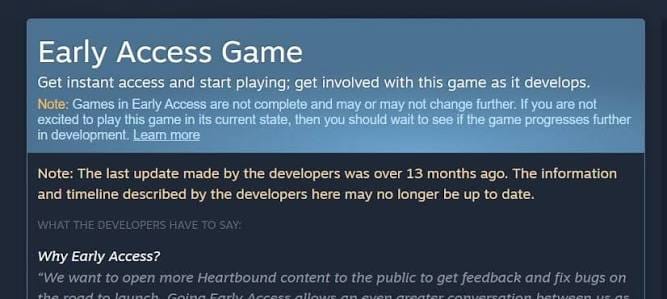
Early Access (Playable In-Development Version): Steam defines Early Access as an unfinished but playable alpha or beta build that should already be worth its current price. It is not a pre-purchase or a guarantee that every roadmap feature will arrive. Players may provide feedback, but they are not required to act as testers.
Full Release (Commercial 1.0 Launch): A game leaving Early Access is presented as feature-complete and no longer undergoing major structural change. Steam says customers will expect stability and a complete experience, while also noting that updates and bug fixes may continue. The label alone does not prove polish, balance, or strong performance.
Try the demo when one exists. Buy Early Access only if you would remain satisfied even if development slowed or stopped. Wait for full release when you want clearer reviews and less uncertainty about the final scope.
The Truth About Steam's 2-Hour Refund Policy: Why It Can't Replace a Free Demo
Steam refunds reduce purchase risk, but they are not an unlimited trial system.
1. The 2-Hour Limit
For games and software bought through Steam, the standard refund window is within 14 days of purchase and with less than two hours of playtime. Requests outside those limits can still be submitted for review, but approval is not guaranteed. Playtime in an Early Access game counts toward the same two-hour limit.
Two hours may not reveal later combat, multiplayer stability, progression, or demanding areas. Setup, account linking, tutorials, cutscenes, and character creation can also consume part of the window. Use the refund policy as consumer protection, not as your main testing plan.
Check the rules for the exact purchase. Bundles, DLC, in-game items, and keys bought from third-party sellers do not all follow the standard game-refund terms.
2. Valve's Refund Abuse Rule
Steam says refunds are intended to remove purchase risk, not to provide free games. If Valve believes an account is abusing refunds, it may stop offering them. The policy does not publish a fixed number of requests, an automatic warning threshold, or a rule stating that every restriction is permanent.
Trying Out Game Demos: Hardware Checks and Core Loop Testing
Playable demos work best when you test them with a clear purpose.
1. Hardware and Performance Checks
Run the demo at the resolution and settings you plan to use. Observe frame-rate stability, stutter, loading, input delay, controller support, key rebinding, text size, display modes, and any included upscaling options.
A good result does not guarantee identical performance in the full game. Steam demos use a separate App ID and may contain a different build or smaller environments. An indoor tutorial may not expose problems found in a crowded city, large battle, or online server.
2. Core Loop Verification
Use the demo to answer practical questions: Are movement and combat responsive? Is the camera comfortable? Are the main systems understandable? Does the repeated activity remain enjoyable after the opening minutes?
Steam Next Fest is useful because it focuses on playable demos for upcoming games and runs three times a year. It lets players compare several titles before paying, although participation is not a quality certification.
Buying Early Access Games: Pay for What Is Playable Today
The safest Early Access rule is to judge the current build, not the roadmap. Steam tells developers not to make customers bet on future features and says buyers should purchase based on the present state.
Before buying, examine three signs of project health:
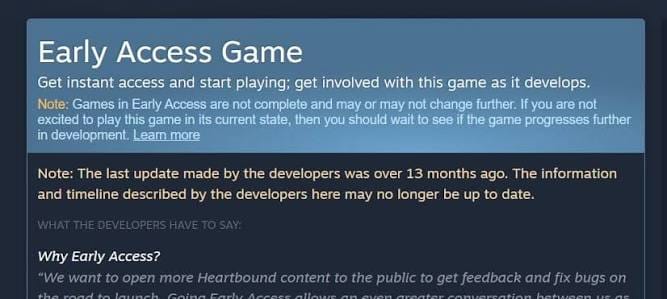
Patch History: Read recent patch notes and look for meaningful changes. Steam adds a notice when an Early Access title has gone more than 12 months without a default-branch build update or an update-type announcement. Activity is helpful, but frequent patches do not guarantee that development matches your priorities.
Recent Reviews: Compare the last 30 days with the lifetime score, then read reviews posted after the latest major update. Steam displays both scores and keeps Early Access reviews labeled after full release.
Developer Communication: Look for specific information about current modes, missing features, save compatibility, known bugs, and pricing plans. Clear explanations and actual updates matter more than an ambitious roadmap.
Do not assume Early Access is always cheaper. Steam allows the final price to rise or fall and does not prescribe one pricing model. Pay only when the content available today justifies the price.
Purchasing the Full Release: Does 1.0 Guarantee Quality?
Waiting for full release removes some uncertainty, but it does not guarantee smooth performance or freedom from major patches. “Released” means the developer has removed the Early Access status and considers the product feature-complete and no longer in a significant state of change.
Check reports from players using hardware similar to yours. Read reviews posted after the launch build, inspect known-issue notices, and confirm whether features such as co-op, cross-play, controller support, offline play, and accessibility options are actually present.
There is no universal reason to wait exactly 24 or 48 hours. For a demanding PC game, waiting for independent performance testing may be useful. For a smaller title with a representative demo, you may already have enough evidence on release day.
The Lesson from DayZ's Five-Year Early Access Period
DayZ is a useful example because its public release timeline is verifiable, while historical review totals are harder to reconstruct accurately.
1. A Five-Year Journey in Early Access
DayZ entered Steam Early Access in December 2013 and reached version 1.0 on December 13, 2018. Its release announcement described the transition as taking place after almost exactly five years.
The lesson is not that every long Early Access project will fail. It is that schedules can expand and priorities can change. A buyer must judge the version available at the time of purchase rather than the experience promised for a later date.
2. Read Reviews in Their Development Context
A current review total cannot prove how many negative reviews existed on a specific date years earlier. Review counts continue changing, users can update reviews, and Steam separates recent and lifetime scores. Early Access reviews are also labeled after release.
When researching an older project, read reviews dated near the relevant update and compare them with recent patch notes. The date, game version, and hardware context are more useful than a dramatic lifetime number.
Choose a demo when you need direct evidence about controls, basic performance, accessibility, or the core gameplay loop. Treat the result as limited to the build and content you tested. Buy Early Access only when the current version already earns its price. Examine patch history, recent reviews, communication, missing features, save risks, and the possibility that the roadmap may change. Wait for full release when you prefer a more settled scope and a larger body of feedback. Even then, verify launch performance and required features instead of assuming that “1.0” means flawless. Steam’s refund policy is useful protection, but it should support not replace a careful purchase decision.